
Answer a few questions about your site to get a recommended hosting tier and price.
Fill in your details and calculate to see your recommended tier.
Recommended tier
Recommended
Your requirements go beyond our standard tiers. Our team can design a custom plan around your site.
Estimates are a starting point — final pricing depends on a full review of your site.
Note: CoreSpeed Tier 1 is included with our SiteCareUSA Gold and Diamond plans. CoreSpeed is only available as part of a SiteCareUSA plan and cannot be purchased separately.
1. Add your estimated monthly traffic. Enter the approximate number of visits or page views your website receives each month. You can find this information in your analytics platform, such as Google Analytics.
For the most accurate recommendation, use a typical month with consistent traffic. If your website experiences seasonal spikes, consider entering your busiest month so you have enough capacity for WordPress speed optimization during periods of higher demand.
2. Enter your required storage. Include the total size of your WordPress database and website files, including images, media, themes, plugins, and other uploads. Your current hosting provider can provide your existing storage usage. You can also check it under the Info tab within WordPress Site Health.
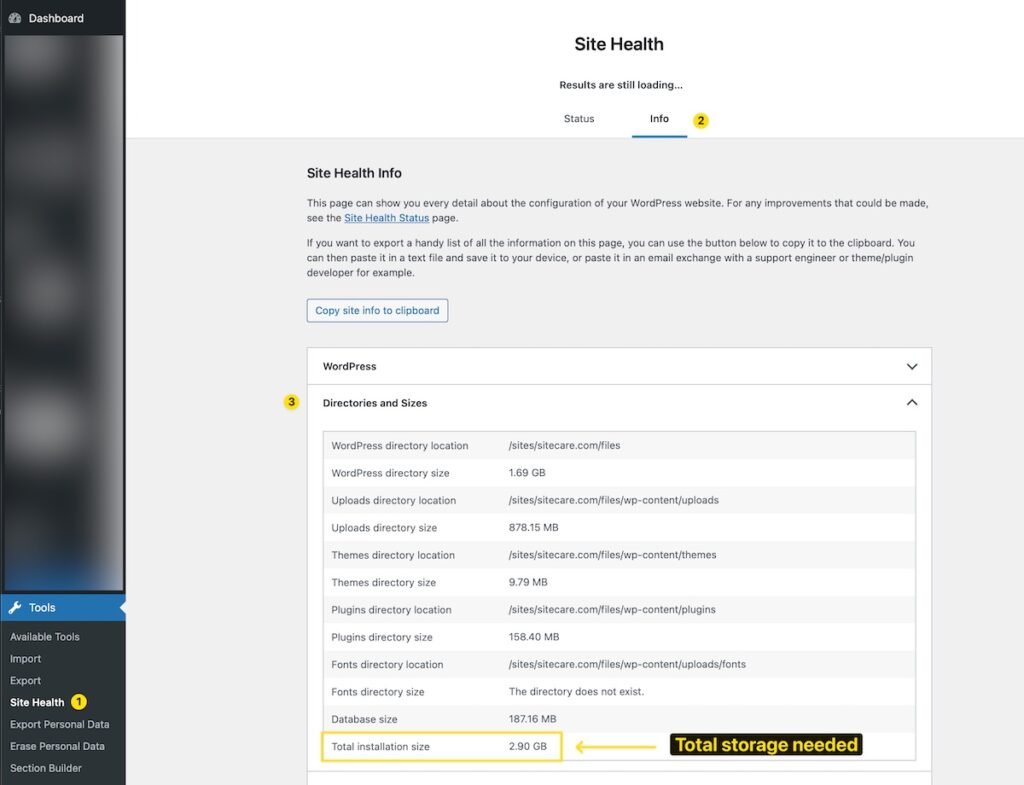
When calculating your storage needs, leave room for future growth—particularly if your website frequently adds image- or video-heavy content.
Important Note: The Total Installation Size does not include “offloaded media.” If your website uses plugins such as WP Offload Media, Infinite Uploads, Advanced Media Offloader, or similar tools, additional assessment may be required to accurately determine your storage needs.
3. Specify whether your website uses WooCommerce or other dynamic functionality. Select “Yes” if your website includes an online store, membership features, learning management system, forums, or any functionality that requires visitors to log in and access personalized content.
Dynamic websites typically need more server resources than simple brochure-style sites because they generate customized content for individual users instead of relying entirely on cached pages.
4. Specify whether you’re using WordPress Multisite. WordPress Multisite allows multiple individual websites to be managed through a single WordPress installation. It’s commonly used by organizations with multiple brands, franchise networks, or educational institutions.
If you select “Yes,” you’ll be prompted to enter the total number of websites within your network. Be sure to include the primary site as well.
Recommended Tier: The hosting plan that most closely fits your website’s needs based on the details you entered. Plans range from Tier 1, designed for smaller websites, to Tier 5, built for websites with higher traffic and greater storage requirements.
Storage Included: The total disk space provided with your selected tier. This includes your WordPress files, media, database, and backups.
Traffic Capacity: The estimated monthly visitor range your recommended tier is designed to support while maintaining strong website performance.
Monthly/Annual Pricing: The price of your recommended hosting tier. Choosing annual billing provides a discount compared with a month-to-month payment.
Recommendation Factors: An overview of the information used to determine your recommended tier. It explains how your traffic, storage requirements, and website complexity contributed to the final recommendation. If WooCommerce or Multisite resulted in a higher tier, that will also be shown here.
All Tiers Comparison: A complete overview of the available hosting tiers, including storage, traffic capacity, and pricing. Your recommended tier is highlighted so you can easily compare it with other options if your website’s requirements change.
If your website’s requirements go beyond what our standard hosting tiers can support, the calculator will recommend scheduling a consultation with our WordPress performance experts. This may apply when:
Your monthly traffic exceeds 1.5 million visits
Your storage requirements are above 200 GB
Your WordPress Multisite network has more than 25 sites
In these situations, our team will work with you to create a custom hosting solution designed around your website’s specific performance, resource, and scalability needs.